
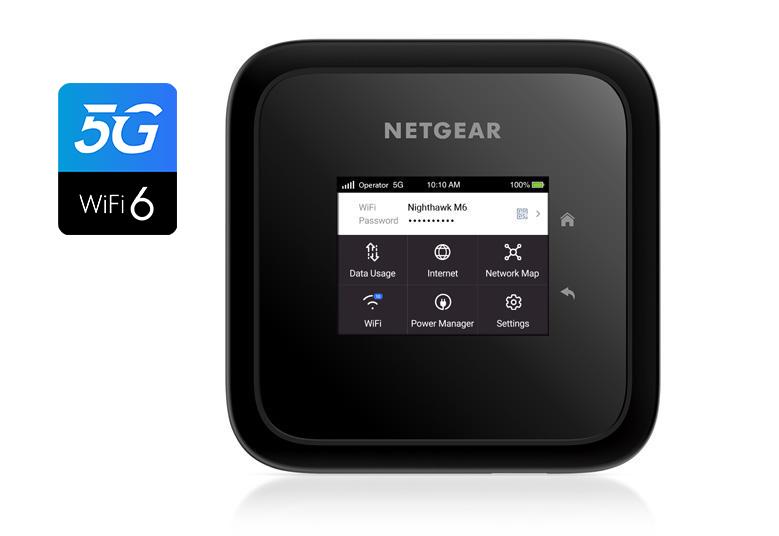
To access Spectrum hotspots, open your device’s settings, select Connections, then WiFi, and choose WiFi Settings Menu. From there, enable Spectrum WiFi auto-connect.
Spectrum Mobile customers can also use their smartphone as a hotspot at no extra charge. Spectrum WiFi access points can also be manually connected by selecting Spectrum Mobile or SpectrumWiFi in your device’s WiFi settings.

Credit: www.youtube.com
What Are Spectrum Hotspots?
Accessing Spectrum hotspots is easy and free for Spectrum Mobile customers. Simply enable Spectrum WiFi auto-connect on your Android device, or manually connect to a Spectrum Mobile WiFi access point. Enjoy fast and reliable internet access wherever you go.
Explanation Of Spectrum Hotspots:
- Spectrum Hotspots are wireless internet access points provided by Spectrum, a telecommunications company based in the United States.
- These hotspots allow users to connect to the internet wirelessly, using their smartphones, laptops, or other Wi-Fi enabled devices.
- Spectrum Hotspots provide a secure and convenient way to access the internet, especially when you’re on the go.
Benefits Of Using Spectrum Hotspots:
- Unlimited Internet Access: Spectrum Hotspots provide unlimited internet access to Spectrum customers, allowing them to browse the web, stream videos, check emails, and more without worrying about data limits.
- Cost Savings: Using Spectrum Hotspots instead of your cellular data can help you save on your monthly data plan costs. You can connect to Spectrum Hotspots for free if you are a Spectrum internet customer.
- Reliable Connection: Spectrum Hotspots utilize the latest wireless technology to ensure a reliable and stable internet connection, so you can stay connected wherever you are.
- Wide Coverage: Spectrum Hotspots are available in various locations across the United States, including popular public places, such as parks, cafes, restaurants, and shopping centers.
Coverage And Availability Of Spectrum Hotspots:
- Spectrum Hotspots are available in thousands of locations throughout the United States, making it easy for Spectrum customers to find a hotspot whenever they need internet access.
- You can check the coverage and availability of Spectrum Hotspots by visiting the Spectrum website or using their mobile app.
- Spectrum is constantly expanding its hotspot network, adding new locations to provide a wider coverage for their customers.
How Spectrum Hotspots Work:
- Spectrum Hotspots work by utilizing a wireless network connection to provide internet access.
- When you’re in range of a Spectrum Hotspot, you can connect to it using your Wi-Fi-enabled device (such as a smartphone or laptop).
- Once connected, you can enjoy fast and secure internet access, just like you would with your home Wi-Fi network.
- Spectrum Hotspots use advanced encryption and security measures to protect your data and ensure a safe browsing experience.
Remember, with Spectrum Hotspots, you can stay connected to the internet wherever you go, enjoy unlimited data, and save on your monthly cellular data costs. So, take advantage of Spectrum’s extensive hotspot network and stay connected on the move.
Finding And Connecting To Spectrum Hotspots
Accessing Spectrum Hotspots is easy and convenient. Simply open the Settings on your Android device, select Connections, then WiFi, and enable Spectrum WiFi auto-connect. You can enjoy unlimited hotspot usage without any extra charges. Stay connected on the go with Spectrum Hotspots.
Locating Spectrum Hotspots Near You:
- Spectrum provides hotspots across various locations in the United States. To find a hotspot near you, follow these steps:
- Visit the Spectrum website or use the Spectrum WiFi Finder app.
- Enter your location or enable location services on your device.
- The app or website will display a map with nearby hotspots.
Using The Spectrum Wifi Finder App:
- The Spectrum WiFi Finder app is a convenient tool to locate and connect to hotspots. Here’s how to use it:
- Download and install the Spectrum WiFi Finder app from your device’s app store.
- Open the app and allow location access if prompted.
- The app will display a map with nearby hotspots based on your location.
- Click on a hotspot marker to view more details, such as the network name (SSID) and location.
Connecting To A Spectrum Hotspot With Your Device:
- Connecting your device to a Spectrum hotspot is easy. Follow these steps:
- Enable Wi-Fi on your device if it’s not already enabled.
- Select the network name (SSID) of the Spectrum hotspot from the available Wi-Fi networks list.
- If prompted, enter the password for the hotspot. If you don’t have the password, you can try connecting to Spectrum’s public hotspots, which are often password-free.
- Once connected, you can enjoy high-speed internet access provided by Spectrum at the hotspot location.
Remember to check the Spectrum website or app for additional information and troubleshooting steps if you encounter any issues while locating or connecting to hotspots. Enjoy your seamless internet experience!
Troubleshooting Spectrum Hotspot Connectivity Issues
Having trouble accessing Spectrum hotspots? Follow these troubleshooting tips to resolve connectivity issues: 1) Make sure WiFi is enabled and within range, 2) Turn WiFi off and then back on, and 3) Check for a strong WiFi signal. For more support, visit Spectrum’s official website.
Common Issues With Connecting To Spectrum Hotspots:
- WiFi signal not found in the area
- Weak or intermittent WiFi signal
- Difficulty connecting to the hotspot network
- Errors or authentication issues when attempting to connect
Steps To Troubleshoot Spectrum Hotspot Connectivity Issues:
- Turn off WiFi on your device and then turn it back on to refresh the connection.
- Check if you are in range of the Spectrum Hotspot network and try moving closer to improve the signal strength.
- Restart your device and try connecting again.
- Verify that you have the correct network name and password for the Spectrum Hotspot.
- Clear the network settings on your device and reconnect to the Spectrum Hotspot.
- Check if there are any software updates available for your device and install them.
- Disable any VPN or proxy connections that may interfere with the hotspot connection.
- Try connecting to the hotspot with a different device to see if the issue is specific to your device.
Tips For Improving Wifi Signal Strength:
- Position your device closer to the Spectrum Hotspot to ensure a stronger and more stable connection.
- Avoid obstacles such as walls, furniture, and electronic devices that may interfere with the WiFi signal.
- Ensure that the Spectrum Hotspot is placed in an open area without any obstructions.
- Reduce the number of devices connected to the hotspot to improve overall speed and performance.
- Adjust the WiFi channel settings on your device to avoid interference from neighboring networks.
Contacting Spectrum Customer Support For Assistance:
If you have followed the troubleshooting steps above and are still experiencing issues with accessing Spectrum Hotspots, it is recommended to reach out to Spectrum customer support for further assistance. They can provide more specific guidance based on your individual circumstances and help resolve any underlying network or account-related issues that may be affecting your connectivity.
Frequently Asked Questions For How To Access Spectrum Hotspots
Is Hotspot Free With Spectrum?
Yes, Spectrum Mobile customers can use their smartphone as a hotspot for no extra charge.
How Do I Automatically Connect To Spectrum Hotspots?
To automatically connect to Spectrum hotspots on Android devices: 1. Open Settings. 2. Select Connections, then WiFi. 3. Choose WiFi Settings Menu, then Advanced. 4. Enable Spectrum WiFi auto-connect.
How Much Hotspot Do You Get With Spectrum Unlimited?
With Spectrum Unlimited, you get 5 GB of hotspot data.
Why Isn T My Spectrum Hotspot Working?
If your Spectrum hotspot isn’t working, try these troubleshooting steps: 1. Turn off and on your WiFi. 2. Make sure WiFi is enabled and you have a strong signal. 3. Ensure you’re within range of the network you’re trying to connect to.
For more help, visit the Spectrum support page for WiFi troubleshooting.
Conclusion
With Spectrum hotspots, accessing reliable and secure internet on the go is easier than ever. By following a few simple steps, you can stay connected wherever you are. Android users can enable Spectrum WiFi auto-connect in the settings menu to automatically connect to hotspots.
For manual connection, simply choose Spectrum Mobile or SpectrumWiFi from the available networks. Enter your Spectrum username and password, review the Terms & Conditions, and you’re good to go. If you’re experiencing any issues, try turning your WiFi off and on again, ensuring a strong WiFi signal, and staying within range of the network.
Spectrum Mobile customers can also use their smartphones as hotspots for no additional charge, providing even more flexibility. So go ahead, enjoy the convenience of Spectrum hotspots and stay connected wherever your day takes you.