
To activate Spectrum Internet, go to activate.spectrum.net on your smartphone or computer. Click on “Get Started” and follow the instructions provided.
Once you’ve activated your modem, create a username to manage your account and equipment. Self-installation is easy and can be done through the My Spectrum App. Download the app, sign in, and you will receive a notification to set up and activate your equipment.
Make sure you have a stable internet connection for the activation process to succeed. By checking if your modem is connected to the internet, you can troubleshoot any issues preventing the activation. With these steps, you can quickly and easily activate your Spectrum Internet service.
Step 1: Setting Up Your Modem
To activate Spectrum Internet, go to activate. spectrum. net using your smartphone or computer and click on “Get Started. ” Follow the provided instructions to activate your service. After activating your modem, create a username for managing your account and equipment.
Self-installation is easy and can be done using the My Spectrum App.
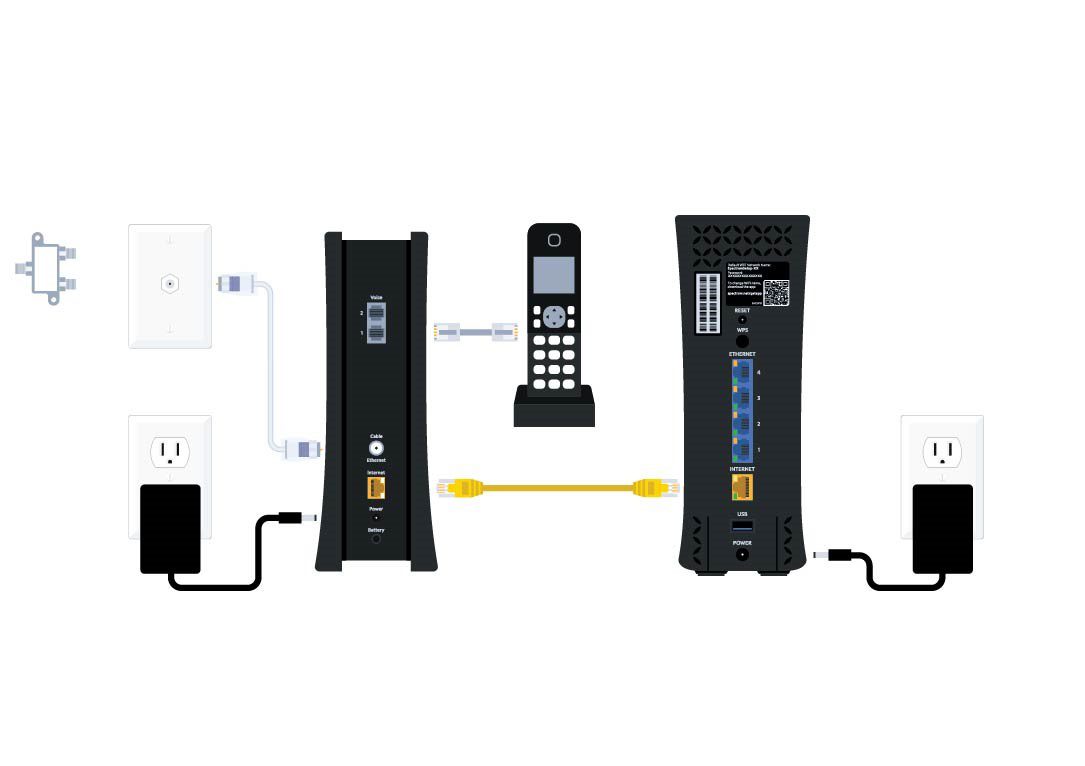
To start activating Spectrum Internet, you need to set up your modem. This involves connecting the modem to your computer or WiFi router and checking your internet connection. Follow the steps below to get started:
Connect The Modem To Your Computer Or Wifi Router
To connect the modem, you have two options: connecting it to your computer or your WiFi router. Choose the option that suits your needs best. Here’s how to do it:
- Connect the modem to your computer:
- Use an Ethernet cable to connect the modem to your computer’s Ethernet port.
- Plug the other end of the Ethernet cable into the Ethernet port on the modem.
- Make sure both ends of the cable are securely connected.
- Connect the modem to your WiFi router:
- Connect one end of an Ethernet cable to the modem’s Ethernet port.
- Connect the other end of the Ethernet cable to the WAN port on your WiFi router.
- Ensure that both ends of the cable are securely connected.
Once you’ve connected the modem to either your computer or WiFi router, you’re ready to proceed to the next step.
Check Your Internet Connection
Before activating Spectrum Internet, it’s important to check your internet connection to ensure everything is working correctly. Follow these steps to check your internet connection:
- Power on the modem and router (if you’re using one).
- Wait for a few minutes to allow the modem to establish a connection with the network.
- Open a web browser on your computer or connect a device to your WiFi network.
- Visit a website to verify if you have internet access.
- If you can access the website successfully, congratulations! Your internet connection is working.
By following these simple steps, you’ll be able to set up your modem and check your internet connection effectively. Once this is done, you can proceed to the next steps of activating Spectrum Internet.
Step 2: Activating Your Service
To activate your Spectrum Internet, head to activate. spectrum. net on your smartphone or computer. Click on “Get Started” and follow the provided instructions. After activating your modem, create a username for account management. Enjoy your Spectrum Internet in no time!
To activate your Spectrum internet service, follow these simple steps:
Visit Activate.Spectrum.Net On Your Smartphone Or Computer
- Open a web browser on your smartphone or computer.
- Type in “activate.spectrum.net” in the address bar.
- Press Enter to go to the activation page.
Click On “Get Started”
- Look for the “Get Started” button on the activation page.
- Click on it to begin the activation process.
Follow The Provided Instructions
- Read through the instructions carefully to ensure you understand each step.
- Complete each step as directed.
- Make sure to follow the instructions in the right order to avoid any issues.
- If you have any questions or encounter any problems, refer to the troubleshooting section or contact Spectrum customer support for assistance.
Activating your Spectrum internet service is a straightforward process that can be done in a few simple steps. By visiting activate. spectrum. net, clicking on “Get Started,” and following the provided instructions, you’ll be able to activate your service smoothly and start enjoying all the benefits of Spectrum internet.
Remember, if you need any help, don’t hesitate to reach out to Spectrum customer support. They’ll be more than happy to assist you throughout the activation process.
Step 3: Creating Your Username
To activate your Spectrum internet, go to activate. spectrum. net on your smartphone or computer. Click “Get Started” and follow the instructions. After activating your modem, create a username to manage your account and equipment. The self-installation process is easy and convenient.
To manage your Spectrum account and equipment, you’ll need to create a username. Here’s how you can do it:
- Go to the Spectrum website (activate.spectrum.net) on your smartphone or computer.
- Click on the “Get Started” button to begin the username creation process.
- Follow the provided instructions to create a unique username for your Spectrum account.
- Make sure to choose a username that is easy for you to remember and secure.
- Once you have created your username, you will be able to access and manage your Spectrum services.
Creating a username for your Spectrum account allows you to conveniently manage your account, view your bill, make payments, and access other useful features. Take the time to create a username that reflects your personal preferences and helps you stay organized.
By following these steps, you’ll be well on your way to managing your Spectrum internet and making the most of your online experience.

Credit: www.whistleout.com
Frequently Asked Questions Of How To Activate Spectrum Internet
How Do I Activate My New Spectrum Internet?
To activate your new Spectrum internet, visit activate. spectrum. net on your smartphone or computer. Click on “Get Started” and follow the provided instructions. After activating your modem, create a username to manage your account and equipment.
How Long Does It Take To Activate Spectrum Internet?
To activate Spectrum internet, go to activate. spectrum. net on your smartphone or computer, click “Get Started,” and follow the instructions provided. It only takes a few minutes.
Can I Set Up Spectrum Internet Myself?
Yes, you can set up Spectrum internet yourself. Go to activate. spectrum. net on your smartphone or computer, click on “Get Started,” and follow the instructions to activate your service. After activating your modem, create a username to manage your account and equipment.
Self-installation is easy and can be done through the My Spectrum App. Make sure you have a stable internet connection for the activation process to succeed.
Why Won T My Spectrum Wifi Activate?
To activate your Spectrum WiFi, visit activate. spectrum. net on your smartphone or computer. Click “Get Started” and follow the instructions provided. Ensure you have a stable internet connection for successful activation.
Conclusion
Activating your Spectrum internet service is a simple and straightforward process that can be completed in just a few easy steps. Once you’ve received your modem, you can activate your service by visiting activate. spectrum. net on your smartphone or computer.
Click on “Get Started” and follow the instructions provided. After activating your modem, you can create a username to manage your account and equipment. Self-installation is a convenient option that allows you to set up Spectrum internet on your own.
By downloading and signing in to the My Spectrum App, you can begin the self-install process. The app will guide you through the necessary steps and notify you when equipment needs to be set up and activated. Before starting the activation process, make sure you have a stable internet connection to ensure a smooth experience.
Checking if your modem is properly connected to the internet is essential. With Spectrum’s self-installation and activation process, you’ll be up and running in no time, enjoying fast and reliable internet service. Take advantage of this convenient option and get connected today.