
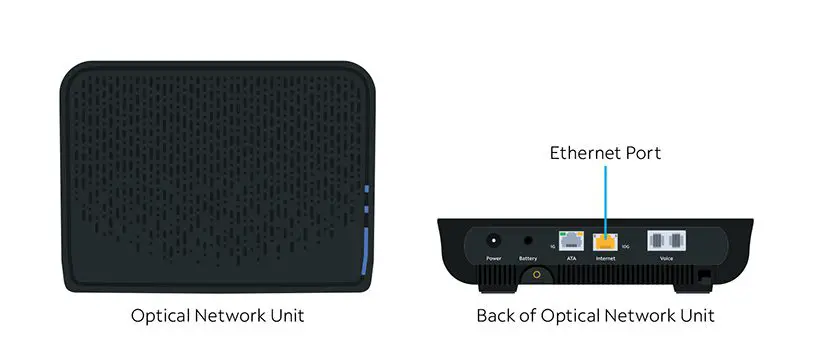
To hook up your home phone on Spectrum, ensure that your phone equipment is connected properly and hung up properly. Make sure your phone has power and is synced to its base unit if you have a cordless phone.
Spectrum Home Phone service works with your existing phone wires, phones, and wall jacks, so you won’t need to purchase new equipment. You can connect the modem to your phone by following the self-installation directions provided by Spectrum. Additionally, every Spectrum TV plan comes with free access to the Spectrum TV App, which you can download on various devices to stream live TV.
Setting Up Your Spectrum Home Phone
To hook up your home phone on Spectrum, follow the self-installation directions provided by Spectrum. Connect the modem to your phone, WiFi router, and wireless devices, customize your WiFi network name and password, and ensure that your phone equipment is properly connected.
Setting up your Spectrum home phone is a simple and straightforward process that ensures you can stay connected with friends and family easily. In this section, we will guide you through each step, from checking your phone equipment to powering on your phone.
Let’s get started!
Checking Your Phone Equipment:
To set up your Spectrum home phone, it’s essential to ensure that your phone equipment is in proper working condition. Here are a few things you should check:
- Verify that your phone is compatible with Spectrum’s home phone service.
- Make sure all the necessary cables and connections are intact and not damaged.
- Check that your phone has a working battery (if it is cordless) or is properly plugged into a power source.
- Ensure that your phone is synced to its base unit (if applicable).
Connecting Your Phone Properly:
Now that you have checked your phone equipment, it’s time to connect your phone properly to the Spectrum home phone service. Follow these steps:
- Connect one end of the phone cable to the phone jack on your wall or modem.
- Connect the other end of the phone cable to the phone base unit or directly to the phone (if it is a corded phone).
- Ensure that the connections are secure and snug to avoid any loose connections or interruptions in service.
Powering on your phone:
Once you have made all the necessary connections, it’s time to power on your phone and ensure that it is ready for use. Here’s what you should do:
- If you have a cordless phone, make sure it is properly charged or connected to a power source.
- Press the power button on the phone or base unit to turn it on.
- Wait for the phone to initialize and sync with the Spectrum network.
By following these simple steps, you can easily set up your Spectrum home phone and enjoy uninterrupted communication with your loved ones. Remember, if you encounter any issues during the setup process, don’t hesitate to reach out to Spectrum’s customer support for assistance.
*Disclaimer: Please note that the specific instructions may vary based on your location and the type of phone equipment you have. It’s always best to consult the official Spectrum website or contact their customer support for detailed instructions tailored to your situation.
*

Credit: www.amazon.com
Activating Your Spectrum Home Phone Service
To activate your Spectrum Home Phone Service, follow these easy steps: connect the modem to your phone, connect the modem to the WiFi router, connect a wireless device to the WiFi network, input your account number and security code, and customize your WiFi network name and password.
Spectrum provides detailed self-installation instructions on their website.
Account Setup And Activation:
To activate your Spectrum Home Phone service, follow these steps:
- Sign in to your Spectrum account or create a new one if you haven’t already.
- Navigate to the “Voice” section within your account settings.
- Select the option to activate your phone service.
- Provide your account number and security code, which can be found on your billing statement or the welcome email from Spectrum.
- Customize your phone service by setting up features such as voicemail, call forwarding, and caller ID.
Verifying Your Phone Service:
Once you have activated your Spectrum Home Phone service, you will need to verify that it is working properly. Here’s how:
- Connect your phone to the Spectrum phone modem or MTA using a phone cable.
- Pick up your phone receiver and listen for a dial tone. If you hear a dial tone, your phone service is successfully activated.
- Test outgoing calls by dialing a few numbers to ensure that your calls are going through.
- Test incoming calls by having someone call your home phone number to check if the calls are coming through to your phone.
Troubleshooting Common Activation Issues:
In case you encounter any issues during the activation process, here are some common troubleshooting steps to follow:
- Verify that all phone equipment is properly connected. Check if the phone cables are securely plugged into the phone modem or MTA.
- Ensure that your phone is hung up properly. Make sure that the receiver is not off the hook and that there are no loose cables or disconnected wires.
- If you have a cordless phone, ensure that it has power and is synchronized with its base unit.
- Check if your phone is compatible with Spectrum’s home phone service. Verify if it is touch-tone enabled and meets the necessary specifications.
- Restart your phone modem or MTA by unplugging it from the power source for a few seconds and then plugging it back in.
- If you are still experiencing issues, contact Spectrum customer support for further assistance.
By following these steps, you can easily activate and verify your Spectrum Home Phone service. In case of any difficulties, Spectrum’s customer support team is always ready to help you troubleshoot and resolve any activation issues you may encounter.
Customizing Your Spectrum Home Phone
Customizing your Spectrum home phone is a breeze. Follow the step-by-step instructions provided by Spectrum, and you’ll have your home phone hooked up and ready to use in no time.
When it comes to using your Spectrum home phone, customization is key to personalize your calling experience. By setting up features such as voicemail, managing calling features, and configuring call forwarding and blocking options, you can tailor your home phone to suit your needs.
Here’s everything you need to know:
Setting Up Voicemail:
- Access your voicemail by dialing your home phone number and pressing the star () key when you hear the greeting.
- Follow the prompts to create a personalized voicemail greeting and set up a unique voicemail PIN.
- Retrieve your voicemail messages by dialing your home phone number and entering your voicemail PIN.
Managing Calling Features:
- Spectrum offers a range of calling features, including caller ID, call waiting, and three-way calling.
- To enable or disable calling features, log in to your Spectrum account and navigate to the Voice section.
- From there, you can customize settings such as anonymous call rejection, selective call rejection, and call forwarding.
Configuring Call Forwarding And Blocking Options:
- To forward calls from your Spectrum home phone to another number, log in to your Spectrum account and go to the Voice section.
- Select the Call Forwarding feature and enter the desired forwarding number.
- You can also configure call blocking options to prevent unwanted calls by adding numbers to your block list.
By customizing your Spectrum home phone, you can make the most out of its features and tailor it to your preferences. Whether it’s setting up voicemail, managing calling features, or configuring call forwarding and blocking options, take control of your home phone experience.
Frequently Asked Questions On How To Hook Up Home Phone On Spectrum
How Do I Get My Spectrum Landline To Work?
To get your Spectrum landline to work, make sure your phone equipment is connected properly, hung up properly, and has power. If you have a cordless phone, ensure that it is synced to its base unit.
How Does A Landline Phone Work With Spectrum?
To use a landline phone with Spectrum, ensure proper connections, hang up the phone properly, and make sure it has power.
Does Spectrum Landline Need A Modem?
No, Spectrum landline does not need a modem. The service works with your existing phone equipment.
How Do I Connect My Phone To My Spectrum Tv?
To connect your phone to your Spectrum TV, download the Spectrum TV App from your device’s app store or channel store. The app is compatible with most devices, including smartphones, tablets, and streaming devices.
Conclusion
Connecting a home phone on Spectrum is a simple process that requires proper equipment setup and connection. By following the provided instructions and using the necessary cables and modems, customers can easily enjoy their home phone service. It’s important to ensure that the phone equipment is connected properly, hung up correctly, and powered on.
Additionally, syncing cordless phones to their base units is crucial for successful operation. Spectrum Home Phone service is compatible with existing phone wires, phones, and wall jacks, eliminating the need for customers to purchase new equipment. Moreover, Spectrum provides resources such as instructional videos and online support to assist customers in completing the installation process.
Customers can also take advantage of the Spectrum TV App, which offers free access to live TV streaming on various devices. With Spectrum’s easy home phone setup, customers can enjoy reliable communication services effortlessly.