
Spectrum Wifi and Internet are not the same thing. Wifi is a wireless signal used to connect devices, while the Internet refers to the network of interconnected devices worldwide.

Credit: www.amazon.com
Understanding The Difference Between Wifi And Internet
WiFi and Internet are not the same thing. WiFi is a wireless signal that connects devices, while the Internet is what the WiFi signal connects you to. Spectrum offers both WiFi and Internet services, allowing you to stay connected at home and on-the-go.
Exploring The Basics Of Wifi And Internet:
- WiFi is a wireless signal used to connect devices, allowing them to exchange data without the need for physical cables.
- The internet, on the other hand, is a global network of interconnected computers and servers that allows users to access and share information.
- WiFi is a means of accessing the internet wirelessly, providing users with the convenience of connection without being limited to a fixed location.
- Internet Service Providers (ISPs) like Spectrum offer both WiFi and internet services to their customers.
How Wifi And Internet Work Together:
- WiFi relies on a device called a router to transmit its signal. This signal is then received by WiFi-enabled devices like smartphones, laptops, and tablets.
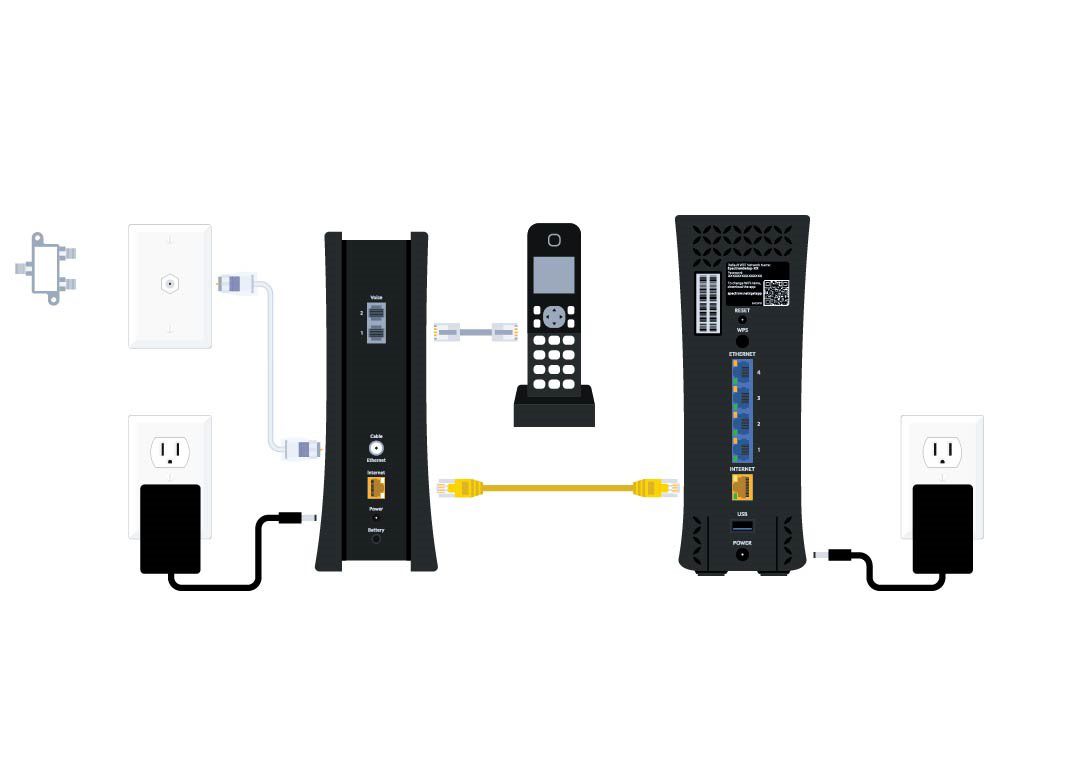
- The router is usually connected to the internet through an ethernet cable, allowing it to provide internet access to connected devices via WiFi signals.
- When a device is connected to a WiFi network, it can use the internet to browse websites, stream videos, download files, and perform other online activities.
Key Differences Between Wifi And Internet:
- WiFi is a wireless technology that allows devices to connect to each other and exchange data, while the internet is a global network that enables access to information.
- WiFi is a localized network, meaning its range is limited to a specific area, usually within a home or office.
- The internet, on the other hand, is a vast network that spans the globe, connecting millions of computers and servers.
- WiFi requires a WiFi-enabled device and a wireless router to establish a connection, while the internet can be accessed through various means, including WiFi, ethernet, and mobile data.
- WiFi is dependent on the availability of an internet connection. If the internet goes down, WiFi may still be active but without internet access.
The Role Of Wifi In Accessing The Internet
WiFi and internet are not the same thing. WiFi is a wireless signal used to connect devices, while the internet is the network of networks that allows you to access information and services online.
How Wifi Allows Wireless Connectivity:
- WiFi is a wireless technology that allows devices to connect to the internet without the need for physical cables.
- WiFi uses radio waves to transmit data, enabling wireless communication between devices.
- WiFi signals are emitted by WiFi routers, which act as access points for devices to connect to the internet.
- WiFi provides convenience and mobility, allowing users to access the internet from anywhere within the range of the WiFi signal.
The Importance Of Wifi Routers:
- WiFi routers are essential for establishing a reliable and secure wireless internet connection.
- Routers act as a central hub for WiFi signals, allowing multiple devices to connect to the internet simultaneously.
- Routers provide a secure network by creating a unique WiFi network name (SSID) and password.
- WiFi routers ensure a stable connection by intelligently managing the distribution of WiFi signals to connected devices.
Connecting Devices To Wifi Networks:
- To connect a device to a WiFi network, navigate to the settings menu on the device.
- Select the option to connect to a WiFi network and choose the desired network from the available options.
- Enter the password for the WiFi network if prompted.
- After successfully connecting, the device will have access to the internet through the WiFi network.
Overall, WiFi plays a crucial role in accessing the internet as it enables wireless connectivity between devices and the internet. WiFi routers act as access points for devices to connect to the internet, ensuring a secure and reliable connection. Connecting devices to WiFi networks involves choosing the desired network and entering the password.
With the convenience and mobility that WiFi provides, users can access the internet from anywhere within the range of the WiFi signal.
Unveiling The Spectrum Wifi Service
Unveiling the Spectrum WiFi service reveals that while WiFi is a wireless signal used to connect devices, it doesn’t always guarantee internet access. Spectrum integrates internet, WiFi services, and mobile to deliver a premier experience at home and on-the-go.
Overview Of Spectrum’S Wifi Service:
- Spectrum’s WiFi service is a wireless signal that enables devices to connect to the internet.
- The WiFi signal is typically transmitted from a device, such as a router, that is connected to the internet via an ethernet cable.
- Spectrum WiFi allows customers to connect their devices to the internet wirelessly, providing convenience and flexibility.
Benefits And Features Of Spectrum Wifi:
- Convenient connectivity: Spectrum WiFi enables users to connect their devices to the internet without the need for physical cables, offering flexibility in device placement and mobility.
- Fast and reliable connection: With Spectrum WiFi, users can enjoy high-speed internet access, allowing for seamless browsing, streaming, and downloading.
- Wide coverage: Spectrum WiFi offers a broad coverage area, ensuring that users can stay connected across their homes or businesses.
- Secure connection: Spectrum WiFi utilizes advanced security protocols to ensure the privacy and protection of users’ data.
- Easy setup: Spectrum WiFi is designed to be user-friendly and easy to set up, allowing customers to get connected quickly and hassle-free.
How Spectrum Wifi Integrates With The Internet:
- Spectrum WiFi uses wireless technology to transmit internet signals, providing users with a convenient way to access the internet without the need for physical connections.
- When a device is connected to Spectrum WiFi, it can access the internet through the wireless signal provided by a Spectrum WiFi-enabled device, such as a router.
- Spectrum WiFi seamlessly integrates with the internet, allowing users to browse websites, stream videos, and engage in online activities with ease.
- By connecting devices wirelessly to the internet, Spectrum WiFi eliminates the need for Ethernet cables and provides users with the flexibility to use their devices anywhere within the WiFi coverage area.
Demystifying The Relationship Between Spectrum Wifi And Internet
Demystifying the Relationship between Spectrum WiFi and Internet – Spectrum WiFi is a wireless signal used to connect devices, which typically connects you to the internet. However, WiFi can also function without an internet connection when the signal is transmitted from an ethernet-connected device like a router.
So, while similar, Spectrum WiFi and internet are not exactly the same thing.
Is Spectrum WiFi the same thing as the internet? This question often confuses people, so let’s clear up any doubts by examining how Spectrum WiFi connects to the internet and how the signal transmission process works.
How Spectrum Wifi Connects To The Internet:
When it comes to understanding the relationship between Spectrum WiFi and the internet, there are a few key points to consider:
- Spectrum WiFi is a wireless signal that allows devices to connect to the internet. It acts as a bridge between your devices and the internet.
- The WiFi signal is typically transmitted from a device, such as a router, that is connected to the internet using an ethernet cable. This device acts as a gateway, allowing the WiFi signal to access the internet.
Examining The Signal Transmission Process:
To better understand how Spectrum WiFi connects to the internet, let’s take a closer look at the signal transmission process:
- The WiFi signal is transmitted wirelessly from the router to your devices. This signal allows you to access the internet without the need for any physical connection.
- Spectrum WiFi uses radio waves to transmit the signal. These waves travel through the air, allowing your devices to connect to the internet from anywhere within the range of the WiFi signal.
- To ensure a strong and reliable connection, Spectrum uses advanced technologies and equipment to optimize the signal transmission process. This ensures that you can enjoy fast and stable internet speeds on your connected devices.
Understanding When Wifi Accesses The Internet:
Now that we have a clearer understanding of how Spectrum WiFi connects to the internet, let’s consider when WiFi actually accesses the internet:
- WiFi accesses the internet when its signal is being transmitted from the router that is connected to the internet. This means that as long as the router is connected to the internet, your devices can access the internet through the WiFi signal.
- It’s important to note that a WiFi signal can exist even without an active internet connection. In such cases, you may still be able to connect to the WiFi network, but you won’t be able to access the internet.
- When setting up your Spectrum WiFi, it’s crucial to ensure that your router is properly connected to the internet. This will ensure that you can enjoy an uninterrupted internet experience on your connected devices.
Spectrum WiFi and the internet are not the same thing, but rather interconnected. Spectrum WiFi acts as a wireless signal that allows devices to connect to the internet when its signal is being transmitted from a device, usually a router, that is connected to the internet.
Understanding this relationship helps ensure a seamless internet experience for Spectrum customers.
Spectrum Wifi Vs Internet: Common Misconceptions
Spectrum WiFi and internet are not the same thing. While WiFi is a wireless signal used to connect devices, it may not always connect you to the internet. WiFi connects to the internet when its signal is transmitted from a device that is plugged in with an ethernet cable.
Clarifying Misconceptions About Spectrum Wifi:
- Spectrum WiFi is a wireless signal used to connect devices.
- The WiFi signal normally connects you to the Internet, but that isn’t always the case.
- WiFi connects you to the Internet when its signal is being transmitted from a device, such as a router, that is plugged in with an ethernet cable.
- Spectrum WiFi is a service provided by Spectrum, a popular internet service provider in the United States.
Debunking Myths About Wifi And The Internet:
- Myth: WiFi and the Internet are the same thing.
- Explanation: While WiFi can connect you to the Internet, they are not the same. WiFi is the wireless technology that allows you to connect devices to the Internet, whereas the Internet is the global network of interconnected computers and servers.
- Myth: Spectrum WiFi service is included in the Spectrum internet package.
- Explanation: While Spectrum internet plans usually come with a WiFi router, the WiFi service itself may require an additional fee. It’s important to check with Spectrum about any associated costs for WiFi service.
Common Misunderstandings About Their Relationship:
- Misunderstanding: Having WiFi means you have access to the Internet.
- Explanation: WiFi is just a means of connecting devices to the Internet. If the WiFi signal doesn’t have an active Internet connection, you won’t be able to access the Internet.
- Misunderstanding: You need a separate WiFi service provider to use WiFi.
- Explanation: WiFi is provided by your internet service provider, like Spectrum, as part of your internet package. You don’t need a separate WiFi service provider.
- Misunderstanding: Using WiFi is always better than using an ethernet cable for internet connectivity.
- Explanation: While WiFi offers the convenience of wireless connectivity, ethernet cables can provide a more stable and faster internet connection in some cases. The choice between WiFi and ethernet depends on factors like device location and internet speed requirements.
Remember, Spectrum WiFi and the Internet are not the same thing, but they are interconnected. Understanding the difference between WiFi and the Internet can help clear up common misconceptions and ensure you make the best use of your Spectrum internet service.
Spectrum Wifi Fees And Router Options
When it comes to Spectrum WiFi fees and router options, it’s important to understand that while WiFi is used to connect devices, it may or may not connect you to the internet. Spectrum Internet customers can use their own router or choose to purchase one from Spectrum for a monthly fee.
Removing the Spectrum WiFi fee can be done by connecting to your own WiFi network.
Understanding The Spectrum Wifi Fee:
- Spectrum Internet customers are required to use an authorized modem to connect to the Spectrum network.
- For a monthly fee, Spectrum provides customers with a pre-configured WiFi router option.
- Customers also have the option to use or purchase their own router.
- The Spectrum WiFi fee covers the cost of the router and the convenience of having a pre-configured device.
Do You Need A Wifi Router With Spectrum?
- Yes, if you want to connect to the Spectrum network wirelessly, you will need a WiFi router.
- Spectrum Internet customers are required to use an authorized modem to connect to the network.
- The router allows you to create a wireless network in your home or office and connect multiple devices without the need for any ethernet cables.
Exploring Authorized Modems And Routers:
- Spectrum provides customers with a list of authorized modems that are compatible with their network.
- Using an authorized modem ensures optimal performance and compatibility with Spectrum’s network.
- Customers can choose to use their own router in conjunction with the authorized modem or opt for the pre-configured WiFi router provided by Spectrum.
- It’s important to note that using an unauthorized modem may result in connectivity issues or a loss of service.
Spectrum WiFi and internet are not the same thing. WiFi is a wireless signal that connects your devices to the internet, while Spectrum Internet refers to the service provided by Spectrum to access the internet. Customers are required to use an authorized modem to connect to the Spectrum network, and they have the option to use a pre-configured WiFi router provided by Spectrum or their own router.
Using an unauthorized modem may result in connectivity issues.
How To Connect To Spectrum Wifi
WiFi and internet are not the same thing. While WiFi is a wireless signal used to connect devices, it may not always connect you to the internet. WiFi connects to the internet when its signal is transmitted from a device plugged in with an ethernet cable.
Step-By-Step Guide For Connecting To Spectrum Wifi:
- Ensure that you are within range of the Spectrum WiFi network.
- Open the WiFi settings on your device.
- Select the Spectrum WiFi network from the available options.
- Enter the password for the Spectrum WiFi network when prompted.
- Wait for your device to connect to the network.
- Once connected, you should see the WiFi icon on your device’s status bar.
Setting Up Spectrum Wifi On Different Devices:
- For Android devices:
- Go to your device’s Settings.
- Tap on “Connections” or “Network & Internet.”
- Tap on “Wi-Fi” and toggle it on.
- Select the Spectrum WiFi network from the list of available networks.
- Enter the password and tap “Connect.”
- For iOS devices:
- Go to your device’s Settings.
- Tap on “Wi-Fi.”
- Make sure Wi-Fi is turned on.
- Select the Spectrum WiFi network from the list of available networks.
- Enter the password and tap “Join.”
- For Windows devices:
- Click on the Wi-Fi icon in the system tray.
- Select the Spectrum WiFi network from the list of available networks.
- Click on “Connect.”
- Enter the password and click “Next.”
Troubleshooting Common Spectrum Wifi Connection Issues:
- Slow or weak connection:
- Move closer to the WiFi router for a stronger signal.
- Check if there are any physical obstructions between your device and the router.
- Restart your device and the router.
- Unable to connect:
- Double-check that you are entering the correct password.
- Restart your device and the router.
- Reset the network settings on your device.
- Intermittent connection drops:
- Check if there are any nearby devices causing interference, such as cordless phones or other WiFi networks.
- Update your device’s WiFi drivers.
- Restart your device and the router.
Remember, connecting to Spectrum WiFi is easy with the right steps and troubleshooting techniques. If you encounter any issues, following the troubleshooting steps should help resolve them. Enjoy seamless and reliable internet connectivity with Spectrum WiFi!
Maximizing Your Spectrum Wifi And Internet Experience
Maximize your Spectrum WiFi and internet experience by understanding the difference between the two. While WiFi is a wireless signal that connects devices to the internet, it doesn’t always guarantee internet access. Learn how to optimize your network connection for a seamless online experience.
WiFi and internet are often used interchangeably, but they are not the same thing. While WiFi is a wireless signal that allows devices to connect to the internet, it is important to maximize your Spectrum WiFi and internet experience to ensure a seamless and fast connection.
Here are some tips and tricks to help you optimize your WiFi signal strength, secure your Spectrum WiFi network, and enhance your internet speed with Spectrum WiFi:
Tips For Optimizing Wifi Signal Strength:
- Place your WiFi router in a central location: Position your router in a central area of your home to maximize coverage and reduce signal interference.
- Avoid physical obstructions: Keep your router away from walls, furniture, and other objects that can obstruct the WiFi signal.
- Adjust the antenna: Tilt and position the router’s antenna to achieve the best signal reception.
- Update your router firmware: Regularly check for firmware updates from Spectrum and install them to ensure optimal performance.
- Use WiFi extenders or mesh systems: If you have a large home or multiple floors, consider using WiFi extenders or mesh systems to extend the signal range.
Securing Your Spectrum Wifi Network:
- Change the default network name and password: Customize your network name (SSID) and password to prevent unauthorized access.
- Enable network encryption: Use WPA2 encryption to secure your WiFi network and protect your data from being intercepted.
- Regularly update your network password: Change your WiFi password periodically to maintain security.
Enhancing Your Internet Speed With Spectrum Wifi:
- Upgrade your internet plan: Consider upgrading to a higher tier of internet service if you require faster speeds for streaming, gaming, or other high-demand activities.
- Optimize your WiFi network settings: Access your router’s settings and make sure to enable features like Quality of Service (QoS) to prioritize certain devices or applications for improved performance.
- Limit the number of connected devices: If you have multiple devices connected to your WiFi network, disconnect any unnecessary devices that may be causing congestion.
- Use Ethernet connections for high-performance devices: Connect devices like gaming consoles or smart TVs directly to your router using Ethernet cables for faster and more reliable internet speeds.
By following these tips, you can maximize your Spectrum WiFi and internet experience, ensuring a reliable, secure, and fast connection for all your online activities.
Frequently Asked Questions On Is Spectrum Wifi And Internet The Same Thing
What Is The Difference Between Internet And Wifi Spectrum?
WiFi is a wireless signal that connects devices. It usually connects you to the Internet, but not always.
What Is Wifi Service On Spectrum Bill?
WiFi service on the Spectrum bill refers to the wireless signal that connects devices to the internet, typically transmitted from a router.
Do I Need A Wifi Router With Spectrum?
Yes, you need a WiFi router with Spectrum. Spectrum Internet customers must use an authorized modem to connect to the Spectrum network. You can either rent a pre-configured WiFi router from Spectrum or use your own.
How Do I Connect To My Spectrum Wifi?
To connect to your Spectrum WiFi, follow these steps: 1. Go to your device settings. 2. Select “Connections” or “Wi-Fi”. 3. Choose the Spectrum Wi-Fi network. 4. If prompted, enter your Wi-Fi password. 5. Enjoy your connected Spectrum WiFi!
Conclusion
To summarize, Spectrum WiFi and internet are not the same thing, but they are closely connected. WiFi is a wireless signal that allows you to connect your devices, such as smartphones, laptops, and tablets, to the internet. However, WiFi does not always guarantee that you are connected to the internet, as it relies on the transmission of signals from a device, typically a router.
On the other hand, internet refers to the actual network that allows you to access and browse websites, send emails, stream videos, and perform other online activities. For Spectrum customers, it is important to note that Spectrum offers both internet and WiFi services.
They provide an authorized modem for internet connection and also offer a pre-configured WiFi router for an additional fee. However, customers have the option to use their own router as well. Spectrum also integrates their internet, WiFi, and mobile services to offer a comprehensive package for a seamless and convenient online experience.
By understanding the difference between WiFi and internet, Spectrum customers can make informed choices and maximize their online connectivity. Whether you’re using Spectrum WiFi or internet, you can enjoy fast and reliable connection for all your digital needs.