
To get Spectrum Internet, you need an authorized modem to connect to the network, and you may also choose to use or purchase your own router. Spectrum provides a pre-configured WiFi router for a monthly fee, or you can use your own.
It is easy to install Spectrum Internet and WiFi with detailed instructions provided in a self-installation kit. You will need an active coaxial cable, similar to the one used for cable TV, for installation. Professional installation is also available as an alternative to self-installation when signing up for Spectrum’s internet service.
Choosing The Right Modem
To get Spectrum Internet, you’ll need an authorized modem to connect to their network. Spectrum also provides a pre-configured WiFi router for a monthly fee, or you can choose to use your own router. Installing Spectrum Internet is easy with their self-installation kits and step-by-step instructions.
Reasons To Choose An Authorized Modem From Spectrum:
- Guaranteed compatibility: Spectrum provides a list of authorized modems that have been tested and approved to work seamlessly with their internet service. Using an authorized modem ensures that you won’t encounter any compatibility issues or connectivity problems.
- Dedicated customer support: When you choose an authorized modem from Spectrum, you have access to their dedicated customer support team. They can assist you with any technical issues or troubleshooting that you may encounter along the way.
- Reliable performance: Spectrum-approved modems are designed to deliver reliable performance and fast internet speeds. They are optimized to work efficiently with Spectrum’s network, providing you with a seamless online experience.
Benefits Of Using Spectrum Provided Modem Vs Using Your Own:
- Plug-and-play setup: Spectrum-provided modems come pre-configured, making the setup process quick and easy. You simply need to plug in the modem, activate your service, and you’re ready to go. This eliminates the hassle of configuring and troubleshooting your own modem.
- Regular firmware updates: Spectrum continuously updates their provided modems with the latest firmware to ensure optimal performance and security. These updates are automatically pushed to the modems, so you don’t have to worry about manually updating the firmware yourself.
- Enhanced security features: Spectrum-provided modems come with built-in security features to protect your network and devices from potential threats. These features include firewall protection, encryption, and parental controls.
How To Choose The Right Modem For Your Spectrum Internet Connection:
- Check Spectrum’s authorized modem list: Before purchasing a modem, make sure it is on Spectrum’s list of approved modems. This ensures compatibility and eliminates any potential issues.
- Consider your internet speed: Different modems support different internet speeds. Be sure to choose a modem that can handle the speed tier you are subscribed to with Spectrum.
- Look for DOCSIS compatibility: Spectrum uses DOCSIS technology for their internet service. Make sure the modem you choose is compatible with the latest DOCSIS version supported by Spectrum.
- Consider additional features: Depending on your needs, you may want to look for modems that offer additional features such as Wi-Fi capability or multiple Ethernet ports.
- Compare prices and reviews: Take the time to compare prices and read reviews of different modems before making your decision. This will help you choose the best modem that fits your budget and meets your requirements.
By following these guidelines, you can choose the right modem for your Spectrum Internet connection and enjoy a smooth and reliable online experience.
The Importance Of Coax Connections
To get Spectrum Internet, you will need an authorized modem to connect to their network, and you may choose to use their pre-configured WiFi router or your own. Installation is easy with step-by-step instructions provided, and a coaxial cable is required for connectivity.
When it comes to setting up Spectrum Internet, one of the most crucial aspects is ensuring proper coax connections. Coaxial cables play a vital role in delivering high-speed internet to your home, allowing for a seamless online experience. Here’s why coax connections are necessary for Spectrum Internet:
- Superior Signal Quality: Coaxial cables are designed to provide excellent signal quality, ensuring that you receive a stable and reliable internet connection. These cables minimize signal loss and interference, resulting in faster speeds and enhanced performance.
- Wide Coverage Area: Coaxial cables have the ability to transmit signals over long distances without any significant loss in quality. This allows your Spectrum Internet service to reach every room in your home, ensuring consistent connectivity throughout.
- Compatibility with Spectrum Equipment: Spectrum Internet service utilizes coaxial connections for modem and router installation. By connecting your modem to a coax outlet, you can take full advantage of the high-speed capabilities and advanced features offered by Spectrum.
How To Connect Your Modem To A Coax Outlet
Connecting your modem to a coax outlet is a straightforward process that you can easily perform on your own. Here’s a step-by-step guide to help you get started:
- Locate the Coax Outlet: Identify the coax outlet in your home where you want to connect your modem. It is typically found in areas like the living room or home office.
- Connect the Coaxial Cable: Take the coaxial cable provided by Spectrum and connect one end to the coax outlet on the wall. Ensure that the connection is secure.
- Connect the Other End to Your Modem: Find the coaxial port on your modem and plug the other end of the cable into it. Make sure it is tightly connected to ensure a strong signal.
- Power on the Modem: Connect the power cord to the modem and plug it into a power outlet. Wait for the modem to power up and establish a connection with the coax outlet.
- Verify the Connection: Check the modem’s status lights to ensure that it is successfully connected to Spectrum’s network. Once the necessary lights are stable, you can proceed with configuring your WiFi settings.
Troubleshooting Common Issues With Coax Connections
While coax connections are generally reliable, occasional issues may arise. Here are some common problems you may encounter with coax connections and how to troubleshoot them:
- Loose Connections: If you experience intermittent or no internet connectivity, check if the coaxial cable is securely connected to both the coax outlet and the modem. Tighten any loose connections to ensure a solid connection.
- Signal Interference: If you notice a decrease in internet speed or frequent disconnections, interference from other electronic devices could be the culprit. Minimize signal interference by keeping your modem away from devices like cordless phones or microwaves.
- Damaged Cables: Check the coaxial cable for any signs of physical damage or wear. If you notice any cuts or frayed ends, consider replacing the cable with a new one.
- Outdated Equipment: If you’ve had the same modem for a long time, it may be outdated and unable to handle higher internet speeds. Consider upgrading to a newer model that supports the speed tiers offered by Spectrum.
By understanding the importance of coax connections, knowing how to connect your modem properly, and troubleshooting common issues, you can ensure a seamless and reliable Spectrum Internet experience in your home.
Setting Up Your Wifi Router
To set up Spectrum Internet, you’ll need an authorized modem to connect to the network. Spectrum can provide a pre-configured WiFi router for a monthly fee, or you can choose to use your own. Connect the modem to a coaxial cable, plug in the power cord, and activate the service.
When it comes to setting up your Spectrum WiFi router, there are a few simple steps you need to follow. By connecting your modem to the router and activating your WiFi service with Spectrum, you’ll be ready to enjoy high-speed internet in no time.
Here’s a breakdown of the process:
- Connecting your modem to the router: To begin, make sure your modem is properly connected to your Spectrum WiFi router. Follow these steps:
- Unpack the kit and locate your modem and router.
- Connect the coax cable from your wall outlet to the coax input on your modem.
- Plug in the power cord for your modem to a power outlet.
- Connect one end of an Ethernet cable to the Ethernet port on your modem and the other end to the WAN or Internet port on your router.
- Activating your WiFi service with Spectrum: Once your modem and router are connected, it’s time to activate your WiFi service with Spectrum. Here’s what you need to do:
- Locate the WiFi status light on your router and wait for it to turn solid green.
- Connect to the WiFi network using your preferred device (e.g., smartphone, laptop).
- Open a web browser and follow the on-screen instructions to activate your service.
- Alternatively, you can download the My Spectrum App on your device and activate your service through the app.
Remember, it’s important to ensure that each step is completed correctly to ensure a smooth setup process for your Spectrum WiFi router. With these simple instructions, you’ll be able to enjoy fast and reliable internet in your home or office.
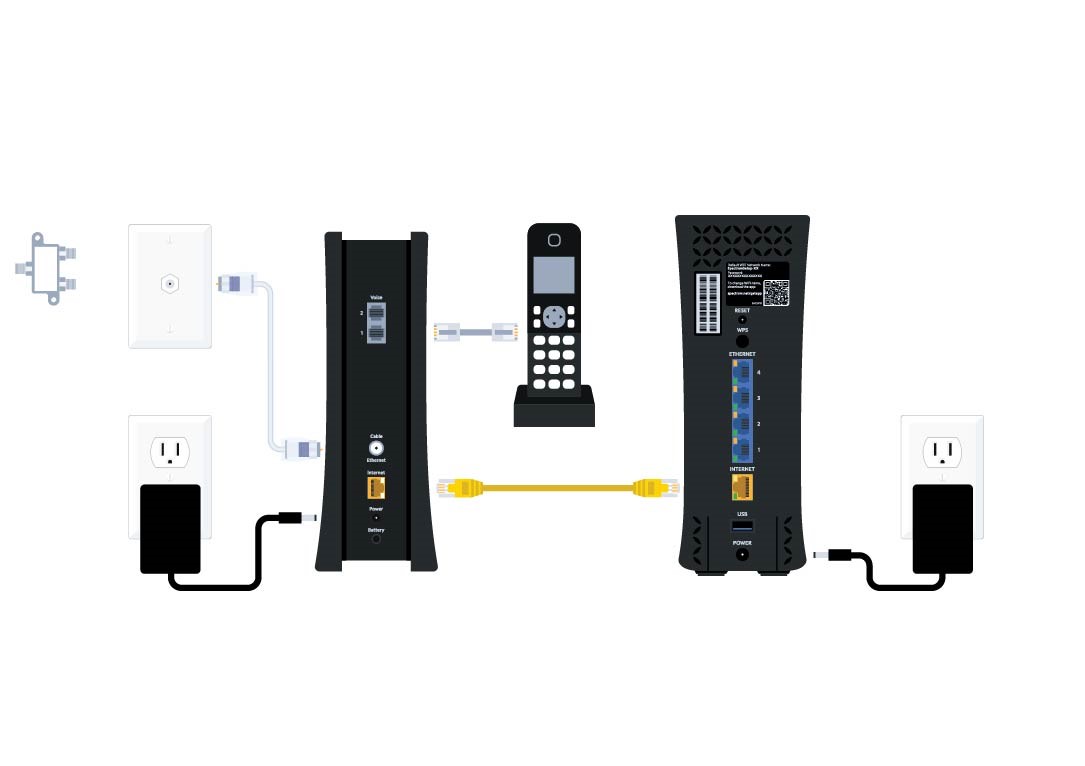
Credit: www.spectrum.net
Using The Spectrum App For Easy Setup
To set up Spectrum Internet, you will need a Spectrum self-install kit and an active coaxial cable. Spectrum provides a pre-configured WiFi router for a monthly fee, or you can use your own router. Installing Spectrum Internet is easy with step-by-step instructions provided.
Overview Of The Spectrum App For Self-Installation:
- The Spectrum app is a user-friendly tool that allows you to set up your Spectrum Internet easily without the need for a technician.
- With the Spectrum app, you can connect your modem and set up WiFi all on your own, saving you time and money.
- The app provides step-by-step instructions and visual aids to guide you through the installation process.
How To Use The App To Connect Your Modem And Set Up Wifi:
- Download and install the Spectrum app on your smartphone or tablet from the App Store or Google Play Store.
- Open the app and sign in to your Spectrum account using your username and password.
- Follow the on-screen instructions to verify your account and select the appropriate self-installation option.
- The app will guide you through the process of connecting your modem to the coaxial cable and power source.
- Once the modem is connected, the app will prompt you to connect an ethernet cable from the modem to your computer or WiFi router.
- After the internet connection is established, the app will assist you in setting up your WiFi network by choosing a network name and password.
- The Spectrum app will also help you activate your service and ensure that it is working properly.
Additional Features And Benefits Of The Spectrum App:
- The Spectrum app provides a convenient way to manage your Spectrum services. You can view and pay your bill, troubleshoot issues, and schedule appointments directly from the app.
- With the app’s WiFi Analyzer feature, you can optimize your WiFi network by identifying areas with weak signal strength and making necessary adjustments.
- The app also offers parental controls, allowing you to manage and restrict access to certain websites and applications for added security and peace of mind.
- Whether you need to troubleshoot connectivity issues or simply want to manage your account on the go, the Spectrum app is a valuable tool that makes it easy for you to take control of your Spectrum Internet experience.
Troubleshooting Connectivity Issues
To get Spectrum Internet, you will need an authorized modem to connect to the network. Spectrum also offers a pre-configured WiFi router for a monthly fee, but customers can choose to use their own router if desired. Installation is easy with the provided self-installation kit and an active coaxial cable.
Having reliable and fast internet is essential in today’s connected world. However, there may be times when you encounter connectivity issues with your Spectrum Internet. Don’t worry, though! In this section, we will discuss common connectivity problems and their solutions, tips for optimizing your Spectrum Internet connection, and contacting Spectrum support for further assistance.
Common Connectivity Problems And Their Solutions
Here are some common connectivity problems you may encounter when using Spectrum Internet, along with their solutions:
- Slow Internet Speeds: If you’re experiencing slow internet speeds, try the following:
- Check your device’s Wi-Fi signal strength and move closer to your router if necessary.
- Restart your modem and router to refresh the connection.
- Close any unused applications or devices that may be hogging bandwidth.
- Reset your modem and router to factory settings if the issue persists.
- Intermittent Connection: If your internet connection keeps dropping out, try the following:
- Ensure your modem is properly connected and all cables are securely plugged in.
- Move your router to a central location in your home for better signal distribution.
- Update your router’s firmware to the latest version.
- Consider using a Wi-Fi booster or extender to improve coverage.
- No Internet Connection: If you’re unable to connect to the internet, try the following:
- Verify that your modem and router are powered on and all cables are connected correctly.
- Check for any outages or scheduled maintenance in your area using Spectrum’s outage map or online support portal.
- Contact Spectrum support if the issue persists or if you suspect a problem with your account or service.
Tips For Optimizing Your Spectrum Internet Connection
To get the most out of your Spectrum Internet connection, consider these optimization tips:
- Place your router in a central location in your home for better Wi-Fi coverage.
- Use a wired Ethernet connection for devices that require a stable and fast connection.
- Keep your router firmware updated to ensure compatibility with the latest devices and security patches.
- Secure your Wi-Fi network with a strong password to prevent unauthorized access.
- Limit the number of devices connected to your network to avoid bandwidth congestion.
Contacting Spectrum Support For Further Assistance
If you have tried troubleshooting connectivity issues on your own without success, it’s time to reach out to Spectrum support for further assistance. Here’s how you can contact them:
- Call Spectrum’s customer support hotline at [insert phone number].
- Visit Spectrum’s website and initiate a live chat with a support representative.
- Use the Spectrum mobile app to access self-help resources and submit a support ticket.
Remember, Spectrum’s support team is available 24/7 to help you resolve any internet connectivity issues you may encounter.
Frequently Asked Questions For What Do You Need To Get Spectrum Internet
What Do I Need To Set Up Spectrum Internet?
To set up Spectrum Internet, you will need a self-installation kit and an active coaxial cable. Follow the instructions provided to connect the coax cable, plug in the modem, connect the Ethernet cable, activate your service, and connect to the WiFi router.
You can also choose to use your own router.
What Equipment Do I Need For Spectrum?
To set up Spectrum Internet, you will need an authorized modem and a WiFi router. You can choose to use Spectrum’s provided router or purchase your own. Connect the coax cable, plug in the power cord, and connect the Ethernet cable.
Activate your service and connect to your WiFi router.
Do You Need A Cable Line For Spectrum Internet?
Yes, you need a cable line to connect your modem for Spectrum Internet.
Is It Easy To Install Spectrum Internet?
Yes, installing Spectrum Internet is easy. You’ll receive a self-installation kit and we’ll guide you through each step.
Conclusion
Setting up Spectrum Internet is a straightforward process that requires a few essential steps. First, you need to ensure that you have an authorized modem, either provided by Spectrum or one that you have purchased yourself. The modem is then connected to a coaxial cable, which is necessary for the internet connection.
Once you have connected the modem, you can proceed with the self-installation process. To complete the installation, you will need to connect the modem’s power cord and an Ethernet cable. Additionally, if you choose to use Spectrum’s pre-configured WiFi router, you can connect it to the modem.
The final step involves activating your service, which can be done either through the My Spectrum app or by following the provided instructions. Installing Spectrum Internet and setting up in-home WiFi is a seamless process and does not require any technical expertise.
With the necessary equipment and a self-installation kit, you can have your Spectrum Internet up and running in no time. Enjoy high-speed internet and reliable connectivity with Spectrum!